 Install with Gale
Advanced Start
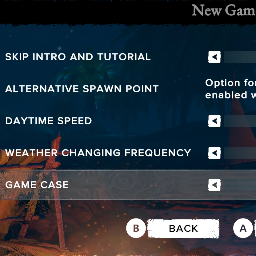
Enables the game's built-in feature of starting mid game, late game, or end game via the Game Case selector.
The Game Case selector shows when you start a new game, and normally only shows when cheats are enabled.
This mod shows the advanced start options, without enabling the cheats.
The Config file for this mod is "Survival Fountain of Youth\BepInEx\config\org.firetron.sfoy.advancedstart.cfg"
As with every SFoY mod, BepInEx is required. Follow BepInEx's install instructions here: https://docs.bepinex.dev/articles/user_guide/installation/index.html
It is easier than it first appears. You just download the right BepInEx file for you Operating System, unzip it, and place its contents into the game's folder. The "content" is about 4 files plus a BepInEx folder. After copying the content to the game root, you will have the BepInEx folder here: Survival Fountain of Youth\BepInEx
Start the game and exit the game.
Now you have a "plugins" folder under your BepInEx folder: Survival Fountain of Youth\BepInEx\plugins
Download some mod files. Unzip them. Copy the DLL files into "plugins".
Start the game again and exit the game again.
Now you have a "config" folder under your BepInEx folder: Survival Fountain of Youth\BepInEx\config
In the config folder you will find a .cfg file for the mod. You can open it in any text editor and change the mod's options there.