 Install with Gale
Builtin Cheats
Enables the game's built-in cheats. Useful for debugging your mods. Completely ruins the fun of normal game play.
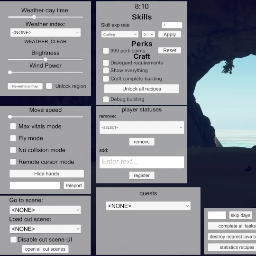
Keyboard shortcuts: Alt 0: Trigger eating animation Shift 1: Toggle pest interruption debug info widget Shift 3: Toggle colliders (highlights some meshes that you can't walk through) Shift 5: Remove negative conditions Shift 6: Relocate to nearest sleeping place Shift 7: Add mesh test view to focused object (often causes crash, does not seem to work, if did work then should just show white mesh lines on object) Shift 8: Trigger an earthquake Alt 9: Trigger drinking animation F7: Toggle display of cheat menu (see screenshot) Shift F7: Toggle all cheats on/off Ctrl G: Toggle mode of performance graphs Ctrl H: Toggle display of performance graphs
The Config file for this mod is "Survival Fountain of Youth\BepInEx\config\org.firetron.sfoy.builtincheats.cfg"
As with every SFoY mod, BepInEx is required. Follow BepInEx's install instructions here: https://docs.bepinex.dev/articles/user_guide/installation/index.html
It is easier than it first appears. You just download the right BepInEx file for you Operating System, unzip it, and place its contents into the game's folder. The "content" is about 4 files plus a BepInEx folder. After copying the content to the game root, you will have the BepInEx folder here: Survival Fountain of Youth\BepInEx
Start the game and exit the game.
Now you have a "plugins" folder under your BepInEx folder: Survival Fountain of Youth\BepInEx\plugins
Download some mod files. Unzip them. Copy the DLL files into "plugins".
Start the game again and exit the game again.
Now you have a "config" folder under your BepInEx folder: Survival Fountain of Youth\BepInEx\config
In the config folder you will find a .cfg file for the mod. You can open it in any text editor and change the mod's options there.